
Are you spending hours at your desk? Does your back ache by the end of the day?
You’re not alone. Many of us spend a huge chunk of our lives sitting in office chairs, but few of us know how to do it right. The way you sit can make a big difference to your comfort, your energy levels, and even your long-term health.
Think of it: a simple adjustment could be the key to saying goodbye to that nagging pain and hello to a more productive, pain-free workday. Ready to transform your sitting experience? Let’s dive into how to properly sit in your office chair and unlock a healthier, happier you.

Credit: ukstore.hermanmiller.com
The Ergonomic Imperative
The ergonomic imperative. It’s more than just a buzzword. It’s about your well-being. Proper sitting prevents pain. It boosts your productivity. Your body will thank you. Investing in ergonomics pays off.
Understanding Your Body’s Needs
Your body needs support. Sitting incorrectly causes strain. Muscles get tired. Nerves can get pinched. This leads to discomfort. You might feel aches. Your focus can suffer. Good posture is key.
The Role Of Your Office Chair
Your chair is a tool. It should support your spine. It should allow natural curves. Adjustable features are important. You can customize your fit. This makes a big difference. Find a chair that works.
Creating A Supportive Seating Position
Feet should be flat. They rest on the floor. Knees form a 90-degree angle. Your back should be straight. Shoulders stay relaxed. Arms rest comfortably. Your monitor is at eye level. This alignment is crucial.

Credit: nationalstair.com
Chair Adjustments For Optimal Support
Proper chair adjustments are key. Set your chair height so feet rest flat. Adjust your backrest for lumbar support. This ensures comfortable, healthy posture.
Your office chair is more than furniture. It is a tool for comfort. Proper adjustments are key. They prevent pain. They boost your productivity. Let’s find the perfect settings.Seat Height Secrets
Adjust your seat height first. Your feet should rest flat. They should be on the floor. Your knees should form a 90-degree angle. Thighs should be parallel to the floor. This position reduces leg pressure. It improves circulation. A simple lever usually controls height.Backrest Balance
Next, adjust the backrest. It supports your spine. Set it upright. It should feel supportive. Your back should touch it. Many chairs have tilt features. Experiment with the tilt. Find what feels best. A slight recline can help. It eases lower back strain.Armrest Alignment
Armrests reduce shoulder tension. Adjust them so your shoulders relax. Your elbows should bend at 90 degrees. Your forearms should rest gently. They should not push up your shoulders. This alignment prevents neck pain. It also eases arm fatigue.Lumbar Love
Lumbar support is crucial. It supports your lower back curve. Many chairs have adjustable lumbar support. Move it up or down. It should fit your natural curve. This padding prevents slouching. It keeps your spine aligned. You will feel less back pain.Your Body’s Blueprint
Your body has a natural design. Sitting correctly supports this blueprint. Learn how to sit well in your office chair.
Your office chair supports your entire body. Proper sitting is key. It follows a natural blueprint. We will explore this blueprint. It starts from your feet up. Understanding this helps you sit well.Foot Foundation
Your feet should rest flat. They should be on the floor. Or use a footrest. Your knees should be bent. Your knees should be at a 90-degree angle. This creates a stable base. It supports your posture.Knee Comfort
Your knees should not press. They should not press against the chair edge. There should be space. A few fingers of space. This allows good blood flow. It prevents discomfort. Keep knees relaxed.Hip Harmony
Your hips should be neutral. They should not be too forward. They should not be too back. Your thighs should be level. They should be parallel to the floor. This supports your lower back. It reduces strain.Spine Alignment
Your spine has natural curves. Your chair should support them. Your lower back needs support. Use a lumbar support cushion. Sit up straight. Shoulders should be relaxed. Head should be balanced. This protects your spine. It prevents pain. `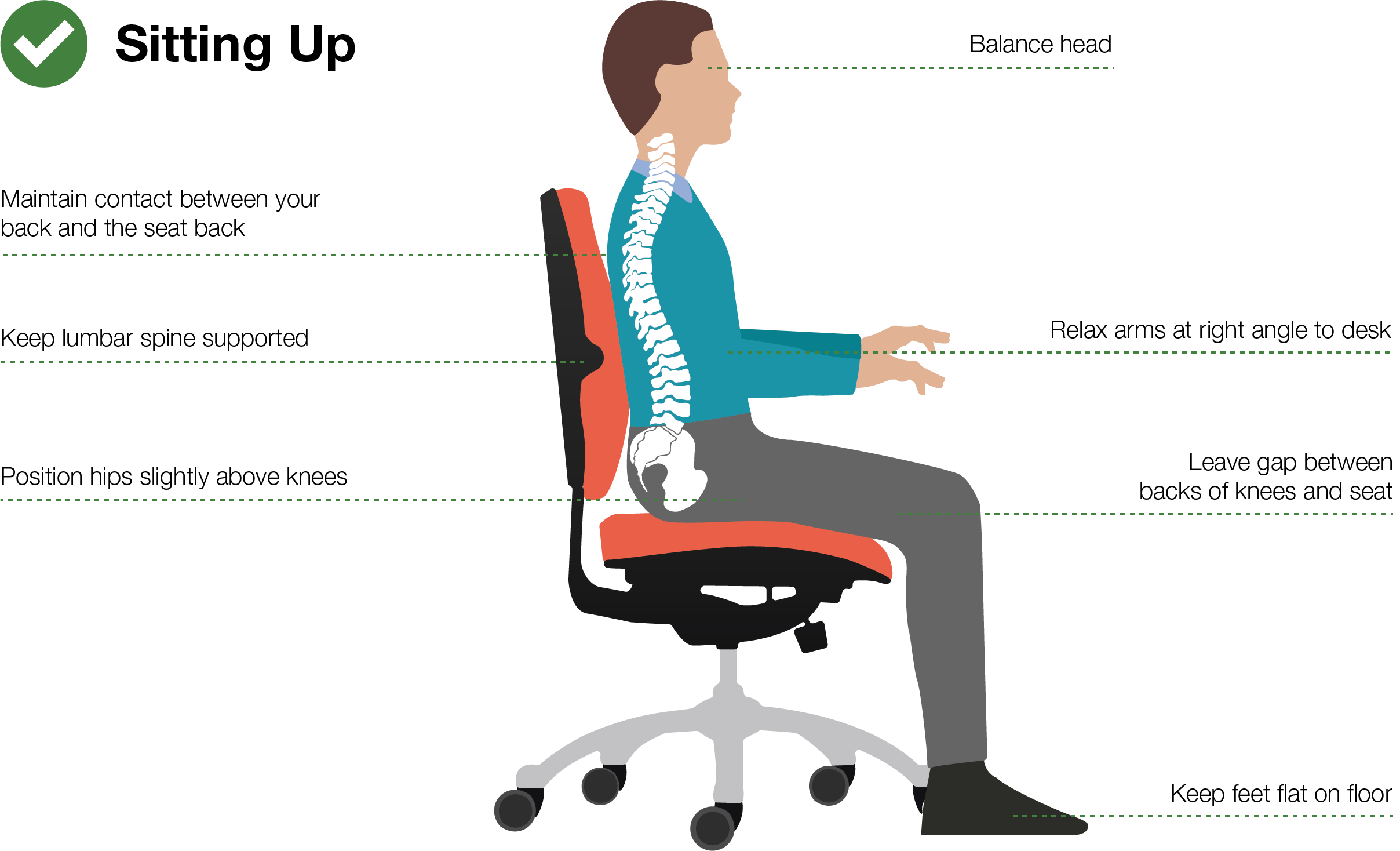
Credit: extintoresmanzano.com
Beyond The Basics: Small Tweaks, Big Gains
Proper office chair sitting goes further. Simple changes bring significant comfort. You can feel much better. These adjustments matter greatly.
Screen Position Strategy
Your screen height is key. The top of the screen should be level. It should be with your eyes. This prevents neck strain. Adjust your monitor stand. Or use books to raise it. Your gaze should be slightly down. This is more natural. Avoid looking up or down too much.
Keyboard And Mouse Mastery
Your arms need good support. Elbows should be at a 90-degree angle. Wrists should stay straight. They should not bend up or down. Keep them neutral. Your keyboard should be close. Your mouse should also be near. This reduces shoulder reach. It prevents arm fatigue. Try a wrist rest. It can help keep wrists straight.
Desk Depth Dynamics
Desk depth affects your reach. You should not overreach. Your chair should be close. Your desk should allow space. Your arms can rest comfortably. There should be room for your thighs. They should be under the desk. Avoid banging your knees. This creates a better workspace. It supports your posture.
The Power Of Movement
Proper sitting helps your body. Good posture reduces strain. Sit with feet flat on the floor. Keep your back straight and supported. This simple change makes a big difference.
Sitting all day is not good. Your body needs to move. Movement keeps you healthy. It also helps you work better. Small movements make a big difference. Embrace the power of movement.Micro-breaks Matter
Take short breaks often. Stand up for a minute. Walk around your desk. Stretch your arms and legs. These micro-breaks refresh your mind. They also prevent stiffness. Even one minute helps. Your body thanks you.Stretching Stations
Set up a stretching station. Use your desk or a wall. Gently stretch your neck. Roll your shoulders backward. Reach for the sky. Touch your toes if you can. Regular stretching boosts blood flow. It eases muscle tension. Make stretching a habit.Active Sitting
Consider active sitting tools. A balance ball is an option. It engages your core muscles. You can also use a kneeling chair. These chairs promote better posture. They encourage subtle movements. Active sitting makes you stronger. It burns more calories too. Your body stays engaged. `Common Sitting Slip-ups
Bad posture at work causes pain. Many people slouch too much. Proper sitting protects your back.
Many people make simple mistakes. These errors happen when sitting. They can cause pain. They can lead to poor posture. Let’s explore some common errors. Understanding them helps you fix them.The Slouching Scourge
Slouching is a big problem. Your back curves forward. Shoulders droop. Your head juts out. This strains your neck. It hurts your spine. Muscles become unbalanced. It feels bad. It looks bad too.The Perched Peril
Some people perch on their chairs. They sit on the edge. Their feet dangle. This is not good. It puts pressure on your thighs. It limits blood flow. Your posture suffers. You cannot relax.The Crossed-legged Conundrum
Crossing your legs seems comfortable. It is a common habit. This can cause issues. It can twist your pelvis. It affects your spine alignment. One leg is higher. This creates imbalance. Blood circulation can also suffer.Investing In Your Well-being
Sitting right matters. Good posture in your office chair prevents pain. Keep your feet flat and back supported.
Your office chair is more than furniture. It is a tool for your health. A good chair supports your body. It prevents pain. It boosts your productivity. Think of it as an investment. An investment in you.Choose The Right Chair
Not all chairs are equal. Look for adjustable features. Your chair must fit your body. Lumbar support is essential. Armrests should be at elbow height. A good chair feels comfortable. It supports good posture.Adjust For Comfort
Sit with your feet flat. Knees should be at a 90-degree angle. Your back should rest against the chair. Use the lumbar support. Adjust armrests for your arms. Your shoulders should be relaxed. Your head should be aligned.Take Frequent Breaks
Sitting too long causes harm. Get up and move often. Walk around your office. Stretch your muscles. Even short breaks help. They refresh your mind. They prevent stiffness.Frequently Asked Questions
What’s The Best Office Chair Sitting Posture?
Sit upright with your back straight. Your feet should rest flat on the floor. Keep your knees at a 90-degree angle.
How High Should My Office Chair Be?
Adjust your chair so your feet are flat. Your knees should form a right angle. This helps your legs relax.
Should My Feet Hang Off The Floor?
No, your feet should not hang. They need to be supported by the floor. This prevents strain on your legs.
How Do I Position My Arms?
Rest your arms comfortably on the armrests. Your shoulders should be relaxed, not hunched. This reduces neck and shoulder pain.
What’s The Best Way To Use Lumbar Support?
The curve of your lower back needs support. Adjust the chair’s lumbar support to fit it. This helps maintain good posture.
How Often Should I Move In My Chair?
Get up and move around often. Even short breaks help your body. Stand up and stretch every 30 minutes.
Can I Slouch In My Office Chair?
Slouching is bad for your back. It puts extra stress on your spine. Always try to sit up straight.
Conclusion
Sitting right matters. Your body will thank you. Adjust your chair for comfort. Feet flat on the floor. Back supported well. Shoulders relaxed, not tense. Eyes level with the screen. Simple changes make a big difference. Feel better at work.
Prevent future pain. Sit smart every day.