
Is your cross-cut paper shredder jamming up or making strange noises? You’re not alone.
A malfunctioning shredder can be incredibly frustrating, especially when you have sensitive documents to dispose of. Don’t worry, you don’t need to toss it just yet! This guide will walk you through simple, effective steps to get your cross-cut shredder working like new again.
We’ll tackle common issues and provide easy-to-follow solutions, so you can get back to secure shredding in no time.
Common Shredder Snags
Paper shredders can be workhorses. They protect your sensitive data. But sometimes, they encounter common problems. These snags can stop your shredding. Don’t worry. Most issues are easy to fix. We will explore these common snags. Then, we will show you how to solve them.
Jamming Issues
Paper jams are frequent. Shredders can get stuck. This happens with too much paper. Overstuffing is a common cause. Thick paper can also cause jams. Try to avoid these mistakes. Turn off the shredder first. Unplug it for safety. Gently pull out stuck paper. Use a letter opener if needed. Reverse the shredder direction. This can help dislodge paper. Clear the bin regularly. A full bin causes jams.
Overheating Problems
Shredders can get hot. They have a motor inside. Constant shredding causes heat. Overheating stops the shredder. It’s a safety feature. Let the shredder cool down. Wait at least 30 minutes. Shred smaller batches of paper. Give the motor breaks. Don’t force it to shred more. Listen for a cooling fan sound. This means it is working.
Unusual Noises
Strange sounds are a warning. Grinding noises are common. This often means dull blades. Oil the shredder blades. Use a shredder lubricant sheet. Run the shredder for a bit. This spreads the oil. Foreign objects can cause noise. Paper clips are a problem. Staples can also cause noise. Check the shredder for debris. Remove any foreign items.
Not Shredding Properly
Shredded paper can be long. It might be in strips. This means dull blades again. Sharpen the blades with oil. Shredder oil is important. You can also use vegetable oil. Check for paper buildup. Clean the shredder blades. A small brush works well. Ensure the shredder is on. Select the correct shredding mode. Some shredders have different settings.
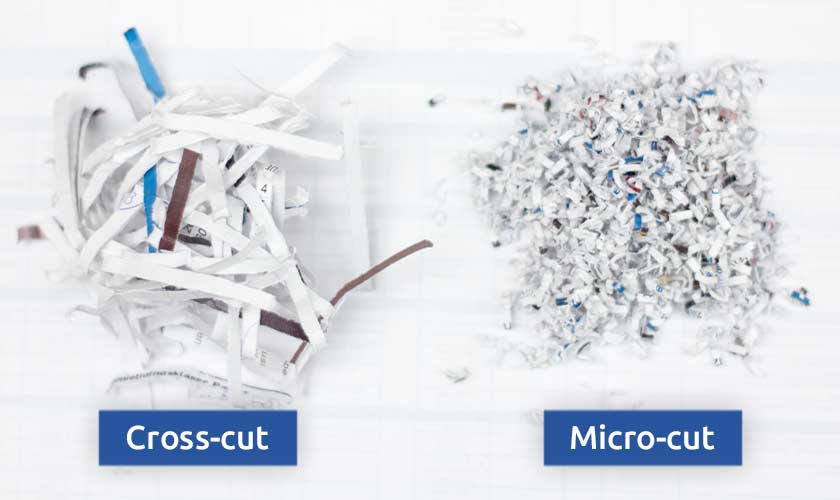
Credit: www.recycling.com
Clearing Paper Jams
Paper jams are common. They stop your shredder. Clearing jams is simple. Follow these steps. Your shredder will work again.
Power Down Safely
First, unplug the shredder. This is very important. It stops electrical harm. Never clear jams with power on. Safety comes first. Always.
Reverse Function Fix
Try the reverse button. Press it for a few seconds. This might free the paper. Some jams clear easily. Give it a try. It often works. You might hear a click. That’s good.
Manual Jam Removal
Unplug again. Locate the jammed paper. Gently pull it out. Use both hands. Be patient. Do not force it. Small pieces may remain. Remove them carefully. A ruler can help. Or tweezers. Get all paper bits. This prevents future jams.
Lubrication For Smoothness
After clearing, lubricate. Use shredder oil. Apply it to the blades. Run the shredder in reverse. Then run it forward. This keeps blades sharp. It also prevents jams. Lubricate monthly. Your shredder will thank you.
Addressing Overheating
Overheating is a common shredder problem. It stops your shredder from working. This section helps you fix it. You can get your shredder running again. Don’t let heat stop your shredding.
Cool-down Periods
Your shredder needs to rest. It gets hot when you use it. Let it cool down completely. This takes about 15 to 30 minutes. Never touch the shredder motor. It can be very hot. Waiting prevents damage. It keeps your shredder safe.
Shredding Capacity
Know your shredder’s limit. Do not shred too much at once. Check the manual for its capacity. Overloading causes overheating. It strains the motor. Shred a few sheets at a time. This is important for its health. Respect its limits always.
Ventilation Checks
Good airflow is essential. Your shredder needs to breathe. Check the vents for dust. Blocked vents trap heat. Use a soft brush to clean them. Compressed air can also work. Ensure the area is clear. No obstructions should be present. This helps the motor stay cool.
Quieting Down Noisy Shredders
Your paper shredder makes loud noises. This can be annoying. It might signal a problem. Don’t worry. You can often fix it. Let’s make your shredder quiet again.
Blade Lubrication
Dry blades grate. They create a loud sound. Lubrication is key. Use shredder oil. Apply it to the blades. Run the shredder briefly. This spreads the oil. Your shredder will be quieter. It also cuts better. Regular oiling prevents future noise.
Foreign Object Check
Something might be stuck. A paper clip or staple. Even a coin. This causes grinding. Turn off the shredder. Unplug it for safety. Look closely at the blades. Use tweezers to remove debris. Check both sides of the blades. Clear out any obstructions. The noise should stop. Your shredder is now safe.
Motor Strain Signs
A struggling motor whines. It sounds like a struggle. The shredder slows down. It smells hot. This means the motor is strained. You might have overloaded it. Or something is blocking the blades. Ensure no jams exist. Let the motor cool down. Avoid shredding too much at once. Overworking damages the motor. Listen for these warning sounds.
Restoring Shredding Quality
Your shredder’s performance can decline. Paper jams occur. Shredding becomes uneven. This section helps fix that. We will bring back its best performance.
Blade Sharpening
Dull blades are the main issue. They tear paper poorly. They create dust. Sharpening restores cutting ability. This makes shredding smooth again.
Preventing Dull Blades
Avoid staplers and clips. These damage the blades. Do not shred too much at once. Overloading causes strain. This dulls blades faster. Regular cleaning helps too.
Correct Shredding Techniques
Feed paper straight. Do not force it. Folded paper jams easily. Shred one sheet at a time. This is best for your shredder. It protects the blades. Shredding quality improves greatly.
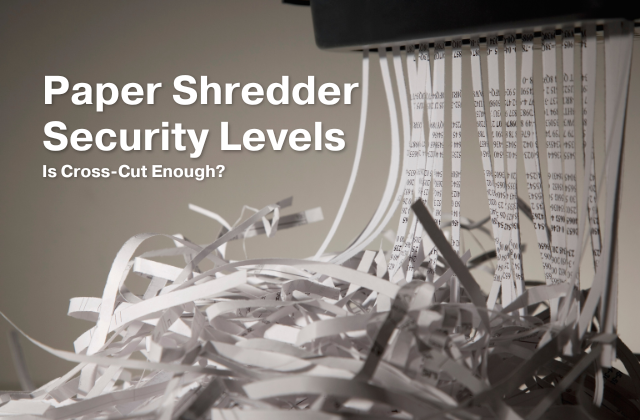
Credit: www.opportunityvillage.org
Maintenance For Longevity
Regular maintenance keeps your cross-cut paper shredder running well. It prevents jams and extends its life. Proper care means fewer repair hassles. Your shredder will work better. It will last much longer.
Regular Cleaning
Dust and paper bits clog shredders. Wipe the shredder blades often. Use a dry, soft cloth. Clean the paper entry slot. Remove any stuck paper. A clean shredder cuts smoothly. This prevents overheating. Keep your shredder dust-free.
Oil And Lubricate
Shredder blades need lubrication. Use special shredder oil. Apply oil to the cutting blades. Do this after emptying the bin. Run the shredder briefly in reverse. This spreads the oil evenly. Oiling reduces friction. It stops blades from dulling. Smooth operation is key.
Emptying The Bin
Never let the bin overflow. An overfilled bin causes jams. It can damage the motor. Empty the bin regularly. Check it often during use. A full bin stops shredding. It makes cleaning harder. Keep the bin clear.
When To Seek Professional Help
Sometimes, DIY fixes are not enough. Your shredder might need expert hands. Knowing when to stop and call a pro saves time. It prevents further damage. Your shredder is valuable. Treat it with care.
Persistent Issues
The shredder jams often. You try everything. Clearing the blades fails. Lubrication does not help. The motor strains. It makes strange noises. These are red flags.
Electrical Problems
The shredder won’t turn on. No lights appear. The power cord seems fine. You checked the outlet. Still nothing happens. This points to internal wiring. Electrical issues are serious.
Internal Damage
You hear grinding sounds. Gears might be broken. The cutting mechanism looks damaged. Visible cracks appear. This means a complex repair. It requires special tools. Professionals have these tools.
Frequently Asked Questions
Why Is My Cross-cut Shredder Jamming?
A common cause is overloading the shredder. Too much paper at once creates a jam. Also, staples and paper clips can cause issues.
How Do I Clear A Jammed Cross-cut Shredder?
First, turn off and unplug the shredder. Gently pull out any visible paper. Use a letter opener to carefully loosen stuck paper.
Can I Oil A Cross-cut Paper Shredder?
Yes, oiling is important for smooth operation. Use shredder oil specifically designed for this purpose. Apply it to the cutting blades regularly.
My Shredder Is Making Strange Noises. What’s Wrong?
Unusual sounds often mean it’s jammed. Or, the motor might need lubrication. Check for any paper stuck in the blades.
How Often Should I Empty My Shredder Bin?
Empty the bin when it’s about two-thirds full. This prevents paper from backing up. A full bin can lead to jams.
Why Is My Shredder Not Turning On?
Check if it’s properly plugged in. Ensure the shredder is not overloaded. Some models have a safety switch that needs resetting.
How Can I Prevent Cross-cut Shredder Problems?
Feed paper slowly and in small amounts. Remove staples and paper clips first. Oil the blades regularly for best results.
Conclusion
Your cross-cut shredder can work again. Simple fixes often solve common problems. Check for jams first. Clean the shredder blades regularly. Oil it to keep it running smoothly. Don’t overload the machine. These steps bring your shredder back to life.
Enjoy secure document disposal once more.