
Living with carpal tunnel syndrome can make everyday tasks feel impossible, especially typing. The tingling, numbness, and pain in your hands and wrists can make sitting down at your computer a dread-filled experience.
You might be wondering if you’ll ever be able to type comfortably again. But don’t give up hope! There are effective strategies and simple adjustments you can make to ease your pain and get back to typing without constant discomfort.
This guide will show you exactly how to type with carpal tunnel, so you can reclaim your productivity and your peace of mind.
Carpal Tunnel Causes
Understanding carpal tunnel causes helps prevent it. It’s a common issue. Many factors contribute to this pain. Knowing them is the first step.
Repetitive Motions
Typing involves many small movements. These motions happen often. They can irritate your median nerve. Think about your daily computer use. Frequent typing is a big one. Assembly line work too. Anything done over and over. It puts stress on your wrist. This stress builds up over time. It can lead to inflammation.
Wrist Position
How you hold your wrist matters. Bending your wrist too much is bad. This includes bending it up or down. Keep your wrist straight while typing. A neutral position is best. Avoid awkward angles. Sleeping with bent wrists is also harmful. This can compress the nerve. Proper posture prevents this. It reduces pressure on the nerve.
Underlying Conditions
Some health problems increase risk. Diabetes is one. Thyroid issues can play a role. Rheumatoid arthritis is another. These conditions cause swelling. Swelling can put pressure on the nerve. Obesity is also a factor. Fluid retention can happen. Pregnancy can also cause swelling. These conditions make the carpal tunnel smaller. This squeezes the nerve.
Credit: myyogateacher.com
Typing Ergonomics
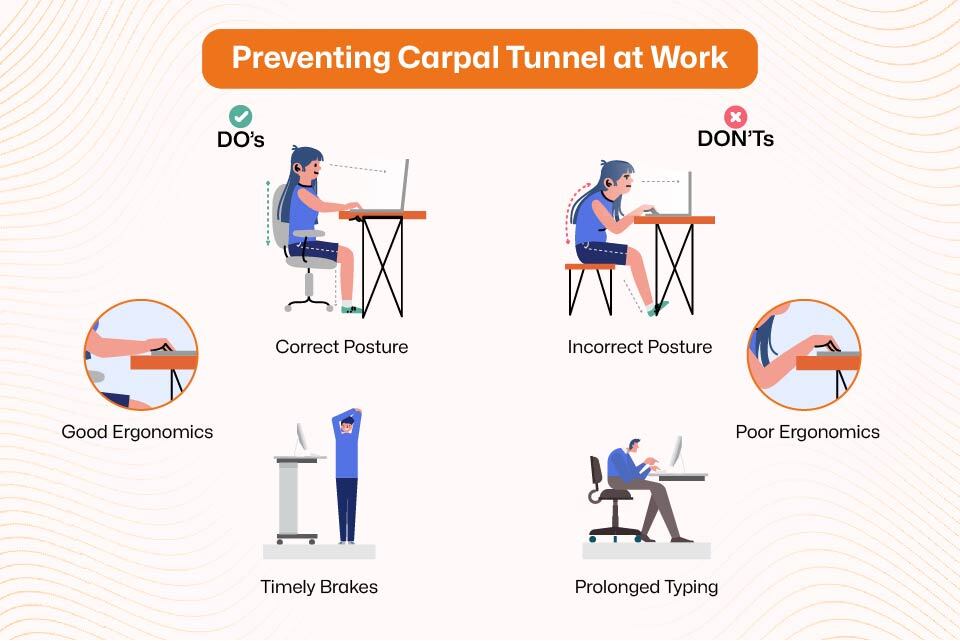
Typing with carpal tunnel requires care. Adjust your setup for comfort. Proper typing posture eases wrist strain.
Good typing ergonomics are crucial. They help prevent pain. They make typing comfortable. Your workspace matters a lot. Adjusting your setup can help. It can reduce carpal tunnel strain. Let’s explore key adjustments.Keyboard Setup
Place your keyboard flat. Or tilt it slightly away. Avoid bending your wrists up. Keep your wrists straight. This reduces pressure. Consider an ergonomic keyboard. Split keyboards can help. They allow a natural arm position.Mouse Placement
Keep your mouse close. Place it near your keyboard. Avoid reaching for the mouse. Your forearm should be relaxed. Your elbow should be bent. Keep your mouse hand neutral. Try a vertical mouse. It can reduce wrist rotation.Chair And Desk Height
Your chair height is important. Feet should rest flat. Your knees should be at 90 degrees. Your desk height matters too. It should allow relaxed shoulders. Your arms should hang loosely. Adjust them until comfortable.Posture Check
Sit up straight. Avoid slouching. Your head should be aligned. Your shoulders should be relaxed. Your back should be supported. Take short breaks often. Stretch your hands and wrists. Move around regularly. This helps prevent stiffness.Typing Techniques
Typing with carpal tunnel requires a mindful approach. Adjusting how you type can bring relief. These techniques help ease strain. You can type more comfortably. Focus on your typing style.
Light Touch Typing
Press keys gently. You do not need force. A light touch works well. Your fingers do the work. Avoid slamming keys. This reduces wrist impact. Feel the keys respond. It is a softer press.
Varying Hand Positions
Shift your hand placement. Do not stay in one spot. Move your hands often. Slight adjustments help. Change your wrist angle. Find a neutral position. This prevents constant pressure. Your wrists will thank you.
Avoiding Excessive Force
Do not press keys hard. Gentle taps are enough. Excessive force causes pain. It strains your tendons. Use just enough pressure. Let the keyboard do its job. Relax your grip. This is very important.

Credit: carpaltunnelpros.com
Breaks And Stretches
Regular breaks and simple stretches are vital. They help prevent carpal tunnel pain. These actions keep your hands and wrists healthy. They are easy to do at your desk. Your body will thank you.
Short, Frequent Breaks
Take a break often. Step away from your keyboard. Do this every 20 to 30 minutes. Stand up and walk around. Move your arms. This simple habit makes a big difference. It reduces strain on your wrists. Your muscles get a chance to relax. It is a small effort for big relief.
Wrist And Finger Stretches
Gentle stretches help immensely. They improve blood flow. They ease stiffness in your hands. Try these simple movements. First, extend your arm forward. Palm facing down. Gently bend your wrist down. Hold for 15 seconds. Repeat on the other side. Next, make a loose fist. Then, spread your fingers wide. Repeat this 10 times. These stretches are quick. They provide immediate comfort. Your fingers will feel more flexible.
Hand And Arm Exercises
Strengthening exercises are beneficial. They build stronger muscles. This supports your wrists. Try squeezing a soft ball. Do this for a few seconds. Repeat 10 times. Another exercise is wrist curls. Hold a light weight. Curl your hand upwards. Lower it slowly. Do this 10 times. These exercises build resilience. They help prevent future pain. Consistent practice yields results.
Assistive Tools
Assistive tools can help. They make typing easier. They reduce strain on your wrists. These tools adapt your workspace. They support your hands. They promote better posture.
Ergonomic Keyboards
Standard keyboards can hurt. They force your wrists flat. Ergonomic keyboards have a different shape. They split into two parts. This lets your hands rest naturally. Your wrists stay straight. Some keyboards curve inward. This reduces wrist bending. You can find split keyboards. Try a curved keyboard. Find what feels best.
Vertical Mice
Regular mice twist your wrist. This causes discomfort. Vertical mice keep your hand in a handshake position. This is more natural. It reduces forearm twisting. Your hand feels more relaxed. Your wrist is in a neutral pose. This helps prevent pain.
Wrist Rests
Wrist rests support your hands. They keep your wrists straight. This prevents them from bending down. Use them when you are not typing. They provide cushioning. They elevate your wrists slightly. This reduces pressure. They offer comfort.
Voice Dictation Software
Typing is not always needed. Voice dictation software converts speech to text. You can speak your words. The computer types them. This eliminates typing altogether. It is a great option. It saves your wrists. It is easy to use. Many programs are available. Explore your choices.

Credit: chiropractorinoviedo.com
When To Seek Help
Carpal tunnel can make typing difficult. Sometimes, self-care is not enough. You might need professional help. Knowing when to ask for it is crucial. It prevents further damage. It helps you find relief sooner.
Persistent Pain
Does your wrist ache often? Does typing make it worse? This pain does not go away. It affects your daily tasks. You should see a doctor. Persistent pain is a warning sign.
Numbness And Tingling
Do your fingers feel strange? Do they tingle like pins? This feeling can be constant. It might happen at night. It can spread up your arm. These symptoms need attention. They indicate nerve issues.
Loss Of Grip Strength
Do you drop things often? Is it hard to hold items? Your grip might feel weak. Simple tasks become challenging. This is a serious symptom. It shows nerve compression. Seek medical advice promptly.
Frequently Asked Questions
How Can I Type With Carpal Tunnel Pain?
Adjust your typing posture and hand position. Keep your wrists straight and relaxed. Take frequent breaks to stretch your hands.
What Are The Best Keyboard Types For Carpal Tunnel?
Consider an ergonomic keyboard. Split keyboards can help. Try a keyboard with a softer touch.
Can Wrist Braces Help With Typing?
Yes, wrist braces offer support. They keep your wrists in a neutral position. Wear them during typing sessions.
What Are Good Typing Exercises For Carpal Tunnel?
Gentle hand and wrist stretches help. Avoid forceful movements. Focus on relaxation and light motion.
How Often Should I Take Breaks From Typing?
Take short breaks every 20-30 minutes. Get up and move around. Stretch your hands and arms.
Can I Use Voice Typing With Carpal Tunnel?
Voice typing is a great option. It reduces strain on your hands. Speak your words clearly and slowly.
What Ergonomic Adjustments Help Typing Comfort?
Position your chair and desk correctly. Ensure your elbows are at a 90-degree angle. Keep your monitor at eye level.
Conclusion
Typing with carpal tunnel is possible. Small changes help a lot. Listen to your body’s signals. Take frequent breaks from typing. Adjust your workspace for comfort. Consider ergonomic tools for support. Proper posture is very important. Gentle stretches can relieve pressure.
Don’t push through the pain. These steps can ease your discomfort. You can type more comfortably.