
Is your computer running hotter than a summer sidewalk? You might need to swap out your case fans, but figuring out the right size can feel like a puzzle.
Don’t worry, we’ve got your back! This guide will make it super simple to find the perfect fan size for your PC. You’ll be keeping your rig cool and quiet in no time. Let’s dive in!
Why Fan Size Matters
Choosing the right case fan size is important. It affects your computer’s cooling. Bigger fans move more air. Smaller fans fit in tight spaces. Understand why fan size matters for your PC.
Airflow And Cooling Power
Fan size directly impacts airflow. Larger fans spin slower. They push more air quietly. This cools your components better. Smaller fans spin faster. They can be louder. They fit where big fans don’t. Get the best cooling for your needs.
Noise Levels
Fan size affects noise. Bigger fans are generally quieter. They move air with less effort. Smaller fans often spin faster. This creates more noise. Consider your noise tolerance. A quiet PC is a happy PC.
Compatibility And Fit
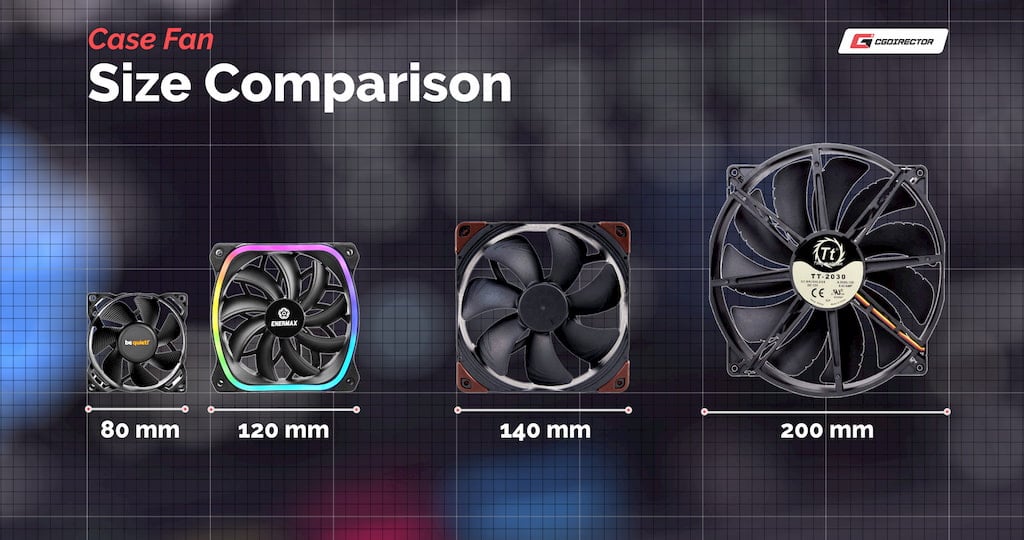
Case fan sizes must fit. Your computer case has specific mounts. Common sizes are 120mm and 140mm. Some cases take 80mm or 200mm fans. Measure your case before buying. Ensure the fan will fit properly. Don’t force a fan.
Static Pressure Vs. Airflow
Some fans are for static pressure. They push air through resistance. Think radiators or filters. Other fans focus on airflow. They move air across open spaces. Fan size influences this balance. Choose the right type for your setup.
Credit: www.reddit.com
Standard Fan Sizes
Understanding standard case fan sizes simplifies your upgrade. You’ll know what fits your computer case. This knowledge saves you time. It also prevents buying the wrong parts. Most computer cases use common fan dimensions. These sizes are widely available. Knowing them helps you choose easily.
The Most Common Size: 120mm Fans
The 120mm fan is king. It is the most popular choice. You find it in most PC cases. It offers a good balance. Good airflow. Quiet operation. Many cases are designed for them. Upgrading to 120mm is often easy. Check your case specifications.
A Larger Option: 140mm Fans
Need more airflow? Consider 140mm fans. These fans are bigger. They move more air. They spin slower. Slower speeds mean less noise. Many modern cases support them. Look for mounting points. These points match the larger size. They provide excellent cooling. Your components stay cooler.
The Smallest Standard: 80mm Fans
Smaller cases use smaller fans. 80mm fans are common there. They are less powerful. They are suitable for tight spaces. Some older cases use them. They are not as efficient. Airflow is moderate. Noise levels can be higher. They are still a standard size. They fit specific needs.
Less Common Sizes: 200mm And Others
Some very large cases exist. They can fit 200mm fans. These fans are huge. They move a lot of air. They are often very quiet. They are not as common. Other sizes are rare. You might see 92mm fans. These are not typical. Stick to common sizes first.
Measuring Your Case
This is the first step. You need to measure your computer case. This tells you what fan sizes fit. Get this right. It saves you trouble later. You will need a ruler or tape measure.
Locating Mounting Points
Find where fans attach. Look for screw holes. These holes mark fan spots. Cases have different mounting areas. Front, back, and top are common. Some cases have side mounts. Note all available spots.
Measuring Clearance
Check the space for fans. Measure the depth available. A fan needs room to spin. Don’t let parts block it. Measure from mounting holes. Measure to the nearest component. This is crucial for airflow. Avoid collisions. Clearance ensures proper function.

Credit: voltcave.com
Measuring Existing Fans
Do you need a new case fan? Maybe your old one is noisy. Or perhaps it is not moving enough air. You must know the size. This helps you buy the right replacement. Measuring your current fan is simple. Let’s find out how.
First, power off your computer. Unplug it completely. This is very important for safety. Open your computer case. You will see the fan inside. It moves air. It keeps parts cool. Identify the fan you want to measure.
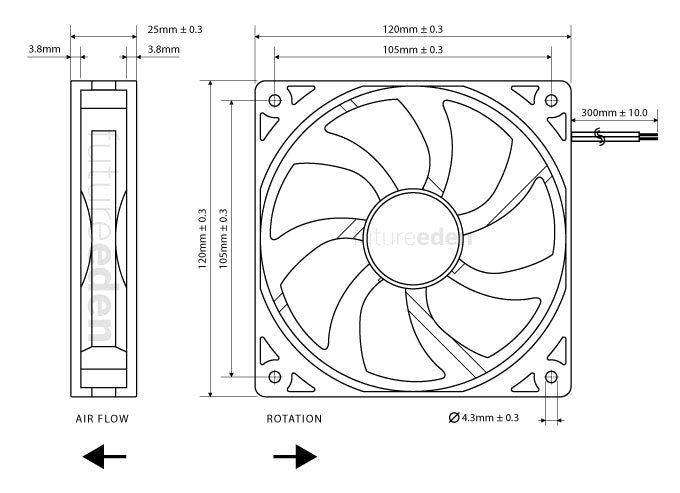
Now, grab a ruler or tape measure. You need to measure the fan’s dimensions. Look at the fan’s front. Measure its width. Measure its height. These two numbers are usually the same. This gives you the fan’s square size. Common sizes are 120mm or 140mm. Note these measurements down.
Do not forget the fan’s thickness. This is its depth. Measure from the front edge to the back edge. Some fans are thin. Others are thicker. This measurement matters for clearance. Make sure the new fan fits. Check the space around the old fan. You can also look at the fan’s frame. It might have size markings. These are often on a sticker. They can be small. Look closely.
Tools You’ll Need
Gather a measuring tape or ruler. A simple tape measure works best. You need to measure the fan’s edges.
Gathering the right tools makes measuring fan size simple. You won’t need many items. Most are common household tools. Having these ready speeds up the process.A Reliable Tape Measure
A standard tape measure is essential. Metal ones work best for accuracy. Make sure it extends at least 12 inches. This covers most fan sizes.A Ruler Or Straight Edge
Sometimes a tape measure is too bulky. A ruler offers an alternative. Use a straight edge for precise lines. This helps with tight spots.A Pen And Paper
Record your measurements carefully. A pen and paper are perfect. Write down the numbers clearly. This prevents mix-ups later.Your Case Fan
You need the fan itself. This is what you are measuring. Have it handy for direct comparison. It’s the most important tool.Beyond Size: Other Fan Specs
Fan size is important. It’s not the only factor. Other specifications matter too. These specs affect cooling performance. They also impact system noise. Understanding them helps you choose wisely.
Airflow (cfm)
CFM stands for Cubic Feet per Minute. It measures air volume. Higher CFM means more air moves. This is good for cooling. It helps dissipate heat. Look for high CFM numbers. This indicates better cooling.
Static Pressure
Static pressure is different. It measures air resistance. Fans push air against obstacles. Radiators and filters create resistance. High static pressure is useful. It pushes air through tight spaces. This is vital for radiators. It ensures proper airflow.
Noise Level (dba)
dBA means decibels. It measures sound loudness. Lower dBA is quieter. Fans create noise. This noise can be annoying. Choose fans with low dBA. This makes your PC quieter. Aim for quieter operation.
Choosing The Right Fan
Choosing the right fan is important. It keeps your computer cool. A good fan improves performance. It also makes your PC last longer. Let’s find the perfect fan for you.
Measure your case first. This is step one. You need to know the space. Fans come in standard sizes. Common sizes are 120mm and 140mm. Some cases use smaller fans. Others need bigger ones. Do not guess the size. Measure it carefully.
Consider airflow needs. How much air do you need? More airflow means better cooling. It also means more noise. Think about your computer’s use. Gaming needs more airflow. Basic tasks need less. Balance cooling and noise. Find a good middle ground.
Check fan mounting points. Where will the fan go? Your case has specific spots. These are mounting points. They match fan screw holes. Make sure your fan fits. Look at the front, top, and back. Rear fans push hot air out. Front fans pull cool air in.
Think about fan speed. Fan speed is RPM. RPM means revolutions per minute. Higher RPM means more air. It also means more sound. Some fans have controllers. You can adjust the speed. This gives you control. Lower speed for quietness. Higher speed for cooling power.
Static pressure matters too. This is important for radiators. It is also for dense filters. Static pressure pushes air. It forces air through resistance. If you have a radiator, check this. Look for high static pressure. This helps with cooling efficiency.
Credit: www.cgdirector.com
Frequently Asked Questions
What Is A Computer Case Fan?
A case fan moves air. It helps cool your computer parts. This keeps your PC running smoothly.
Why Do Case Fans Need Measuring?
Knowing the size is important. It ensures fans fit your PC case. Correct size means better airflow.
How Do I Measure My Case Fan Size?
Measure the fan’s side length. This is usually in millimeters. Standard sizes are common.
What Are Common Computer Fan Sizes?
Common sizes include 80mm, 120mm, and 140mm. These fit most computer cases. Always check your case manual.
Can I Put A Bigger Fan In My Pc?
Usually, no. A bigger fan won’t fit. It could block other components. Stick to the recommended size.
How Do I Know My Case Fan’s Cfm?
CFM means cubic feet per minute. It shows airflow volume. Check the fan’s label or specs.
Do Fan Sizes Affect Cooling Performance?
Yes, bigger fans often move more air. But proper fit is key. Good airflow keeps things cool.
Conclusion
Choosing the right case fan size matters. Measure carefully before buying. Standard sizes exist. Know your case’s needs. Proper airflow improves cooling. Quiet operation is possible. Get the best fan for your PC. Enjoy a cooler, quieter computer.