
Speaker Connection Basics
Connecting external speakers enhances your TV’s sound. Most TVs have specific ports for audio output. You can use HDMI, optical, or RCA cables for this.
Connecting external speakers transforms your TV audio. It brings movies and music to life. This guide simplifies the process. We cover essential speaker connection basics. You will get better sound easily.Identifying Your Tv’s Audio Ports
Look at the back of your TV. You will see many ports. Some are for video. Others are for audio. Find the ones labeled “Audio Out.” Common audio out ports exist. You might see an “Optical” port. It is usually a small, square one. It has a red light inside. Another common port is “HDMI ARC.” ARC means Audio Return Channel. It sends audio back to your sound system. Some TVs have a “Headphone” jack. This is a 3.5mm round port. Older TVs may have “RCA” ports. These are red and white jacks. They are round.Understanding Speaker Input Options
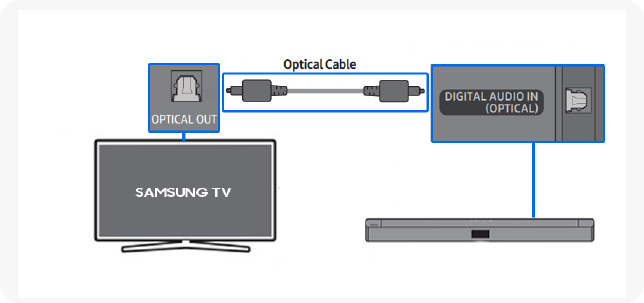
Your speakers need to match your TV. Check your speaker’s back panel. It shows its input options. Optical inputs are common. They accept digital audio signals. HDMI ARC is also popular. It uses a single cable. Soundbars often use this. Headphone jacks are simple. They plug directly into your TV. RCA inputs use red and white cables. These are analog signals. Some speakers have Bluetooth. This is a wireless connection. It offers great convenience. Match your TV’s output to speaker input. This is the key step.Wired Connections
Connect external speakers using audio cables. Check your TV’s audio output ports. Plug the correct cable into your TV and speakers.
Wired connections offer reliable audio. They give you a solid link. This ensures a consistent sound experience. Forget wireless dropouts. Get straight to the good sound.Hdmi Arc: The Modern Standard
HDMI ARC is very popular. It stands for Audio Return Channel. Your TV sends audio back. It uses the same HDMI cable. One cable handles everything. It’s simple and effective. Check your TV for the ARC port. Most new TVs have it.Optical Audio (toslink): Clear And Simple
Optical audio uses light. It’s also called TOSLINK. This cable is often square. It transmits digital sound. The signal is very clean. You get excellent audio quality. It’s a great choice for soundbars.3.5mm Headphone Jack: A Quick Fix
Your TV might have this. It’s a common headphone port. You can plug in speakers here. Use a 3.5mm audio cable. This is a simple solution. It works for basic setups. It’s easy to find.Rca Audio Cables: The Classic Choice
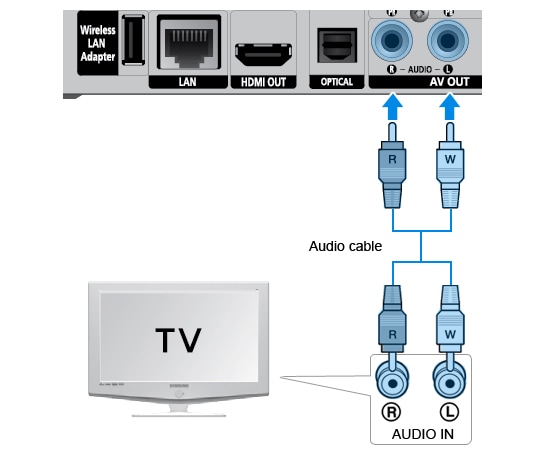
RCA cables are classic. They use red and white plugs. Red is for the right channel. White is for the left channel. You need an adapter sometimes. Many older TVs use these. They provide stereo sound. `Wireless Connections
Wireless connections offer freedom. No messy cables are needed. Enjoy great sound easily. Your TV and speakers connect wirelessly. It is a simpler way to listen.
Bluetooth: Untethered Sound
Bluetooth is very popular. Many TVs have it built-in. Your speakers also need Bluetooth. Turn on Bluetooth on both. Your TV will find the speakers. Select your speakers to connect. Enjoy music without wires. Sound quality is usually good. It is great for casual listening.
Wi-fi Speakers: Networked Audio
Wi-Fi speakers use your home network. They connect to your router. This gives a stronger signal. Sound can be more robust. Setup can be a bit more involved. You might need an app. Follow the app’s instructions. These speakers offer excellent audio. They are great for a home theater. Enjoy immersive sound. Your TV and speakers work together.
:max_bytes(150000):strip_icc()/soundbar-audio-inputs-analog-a-4df986332b994b01a0e14e1fe43c2648.jpg)
Credit: www.gew-llc.com
Setting Up Your Speakers
You have your speakers. Now, let’s connect them. This step brings your TV’s sound to life. Proper setup is key. It ensures you hear every detail. Get ready for an immersive audio experience.
Connecting Cables Or Pairing Devices
Check your TV and speakers. Do they have ports? Look for an audio output. Common ports are HDMI ARC, optical, or RCA. Plug the correct cable in. For wireless speakers, you will pair them. Follow your speaker’s instructions. Use Bluetooth or Wi-Fi. Make sure the connection is strong.
Configuring Tv Audio Settings
Turn on your TV. Go to the TV settings menu. Find the audio or sound options. Select your connected speakers. This might be an output setting. Choose the right audio format. PCM is often a safe bet. Some TVs need a restart. Do this after changing settings.
Adjusting Speaker Volume And Balance
Now, play some audio. Start with low volume. Turn up your TV’s volume. Adjust your speaker’s volume next. Find a comfortable listening level. Check the sound balance. Is it centered? Make small adjustments. You want clear, balanced sound.
Troubleshooting Common Issues
Hooking up external speakers can really improve your TV sound. Sometimes, things don’t work perfectly. Don’t worry. Troubleshooting common issues is simple. We will fix your sound problems.
No Sound From Speakers
First, check the volume. Is it turned up? Make sure the speakers are on. Check the power cable. Is it plugged in securely? Look at the audio cable. Is it connected correctly? Try a different cable. Test the speakers with another device. Are they working? Restart your TV. Restart your speakers too. These steps often solve the problem.
Distorted Or Crackling Audio
Loose connections cause crackling. Wiggle the audio cable gently. Ensure it is pushed in all the way. Check for damaged cables. A frayed wire can cause issues. Try a new audio cable. Sometimes interference is the culprit. Move speakers away from other electronics. Wireless interference can also cause problems. Check your speaker’s manual for tips. Adjusting audio settings might help. Lower the bass slightly. This can reduce distortion.
Connectivity Problems
Verify the correct input is selected. Your TV must match the speaker input. For HDMI ARC, check TV settings. Enable HDMI ARC on both devices. Ensure Bluetooth is paired correctly. Forget the device and re-pair it. Restart both TV and speakers. This often resets connections. Consult your TV manual. Consult your speaker manual. They have specific connection guides.
Credit: www.samsung.com
Credit: readystudygoacademy.com
Conclusion
You can easily improve your TV sound. Connect external speakers. It makes a big difference. Enjoy richer audio. Your movies will sound better. Music gains new depth. Setup is usually simple. Check your TV’s audio ports. Use the right cables.
Your sound experience awaits. Give it a try today.