
Is your motion sensor light staying on all the time and wasting energy? It can be frustrating when your light doesn’t work as it should, leaving your home less secure and your bills higher.
But don’t worry—you can fix this yourself. You’ll learn simple steps to troubleshoot and repair your motion sensor light quickly. By the end, your light will work perfectly, turning on only when you need it. Keep reading to save money and bring back the smart function of your motion sensor light.

Credit: www.youtube.com
Common Causes Of Motion Sensor Lights Staying On
Motion sensor lights are very useful for security and convenience. They turn on only when they detect movement. Sometimes, these lights stay on all the time. This issue can waste energy and cause frustration. Understanding common causes helps fix the problem quickly.
Sensor Obstructions
Objects blocking the sensor can cause it to stay on. Dirt, leaves, or spider webs may cover the sensor lens. This makes the sensor think there is constant movement. Cleaning the sensor regularly helps it work properly. Also, check for nearby plants or objects that might move in the wind. These can trigger the sensor falsely.
Incorrect Sensitivity Settings
Sensitivity controls how much motion the sensor detects. If set too high, the light stays on from small movements. Lowering the sensitivity can stop false triggers. Some sensors have adjustable dials or switches. Test different settings to find the best one. This keeps the light on only when needed.
Faulty Wiring
Loose or damaged wiring can cause the sensor light to stay on. Electrical faults may send constant power to the light. Check connections for corrosion or wear. Tighten any loose wires carefully. If wiring looks damaged, consider calling a professional. Proper wiring ensures the sensor works correctly.
Environmental Factors
Weather and temperature changes affect sensor performance. Heat from the sun can trigger the sensor during the day. Cold weather might cause electrical parts to malfunction. Nearby heat sources like air conditioners or vents confuse the sensor. Position the sensor away from such sources. Shielding the sensor helps reduce false alarms.
Simple Troubleshooting Steps
Fixing a motion sensor light that stays on does not need to be hard. Start with some simple checks that can solve most problems fast. These basic steps help find common issues without tools or expertise. Follow these easy tips to get your light working properly again.
Check For Physical Blockages
Look closely at the sensor lens. Dirt, leaves, or spider webs can block the sensor. Clean the lens gently with a soft cloth. Make sure no objects are in front of the sensor. Trees, walls, or furniture can trigger the light wrongly. Clear the area around the sensor to avoid false signals.
Adjust Sensitivity And Timer Settings
Find the sensitivity dial on the sensor unit. Turn it down if the light stays on too long. If sensitivity is too high, small movements keep the light on. Set the timer to a shorter time to prevent long lighting. Test changes by walking in front of the sensor. Keep adjusting until the light works right.
Reset The Motion Sensor
Power off the light for about 30 seconds. This resets the sensor’s memory. Turn the light back on and watch the sensor’s reaction. A reset can fix minor software glitches. If the light still stays on, try the next step.
Inspect The Power Source
Check if the light is receiving steady power. Loose wires or a faulty connection may cause problems. Turn off the power before inspecting wires. Tighten any loose connections carefully. Replace damaged wires if needed. A stable power supply keeps the sensor working correctly.
Repairing Wiring Issues
Wiring problems often cause motion sensor lights to stay on. Fixing these issues can stop the light from running all the time. This section covers easy steps to repair wiring problems safely and correctly.
Turn Off Power Safely
Start by turning off the power at the circuit breaker. This prevents electric shocks while working. Use a voltage tester to check if the power is really off. Never touch wires before confirming no electricity flows.
Examine Connections
Look closely at all wire connections inside the light fixture. Loose or corroded wires can cause constant power flow. Tighten any loose screws and clean corrosion with a small brush. Make sure wires are connected to the right terminals.
Replace Damaged Wires
Inspect wires for cuts, cracks, or burns. Damaged wires must be replaced to avoid shorts or faults. Cut out the bad section and strip fresh wire ends. Use wire nuts to connect new wires securely. Check the wiring matches the light’s diagram.

Credit: www.youtube.com
Replacing Faulty Components
Replacing faulty components is a key step to fix a motion sensor light that stays on. Over time, parts can wear out or break. This causes the sensor to malfunction and keep the light on. Fixing these issues often means swapping out the bad parts with new ones. This restores the sensor’s normal function and saves energy.
Identify Defective Sensors
Start by checking the sensor carefully. Look for cracks, dirt, or damage. Test the sensor by covering it and seeing if the light turns off. If the light stays on, the sensor might be faulty. Sometimes, the sensor’s internal parts fail. Use a multimeter to check for electrical issues. Mark any sensor that does not respond properly.
Choose Compatible Replacement Parts
Find replacement sensors that fit your light model. Check the voltage and size before buying. Using wrong parts can cause more problems. Look for sensors with similar specifications. Choose parts from trusted brands or the original manufacturer. This ensures the new sensor works well and lasts longer.
Install New Sensors
Turn off power to the light before starting. Remove the old sensor by unscrewing it carefully. Connect wires from the new sensor to the existing wiring. Match wire colors and secure connections tightly. Attach the new sensor to the light fixture. Turn the power back on and test the sensor. Adjust settings if needed for best results.
Preventive Tips To Avoid Future Problems
Preventing motion sensor lights from staying on saves energy and frustration. Simple steps help keep the system working well. Consistent care avoids many common issues with sensors.
Regular Maintenance
Check the sensor and light at least once a month. Clean dirt and spider webs from the sensor surface. Dust can block the sensor’s view and cause errors. Replace bulbs as soon as they start to dim. Test the sensor after cleaning to ensure it works right. Regular upkeep helps the sensor detect motion properly.
Proper Installation Practices
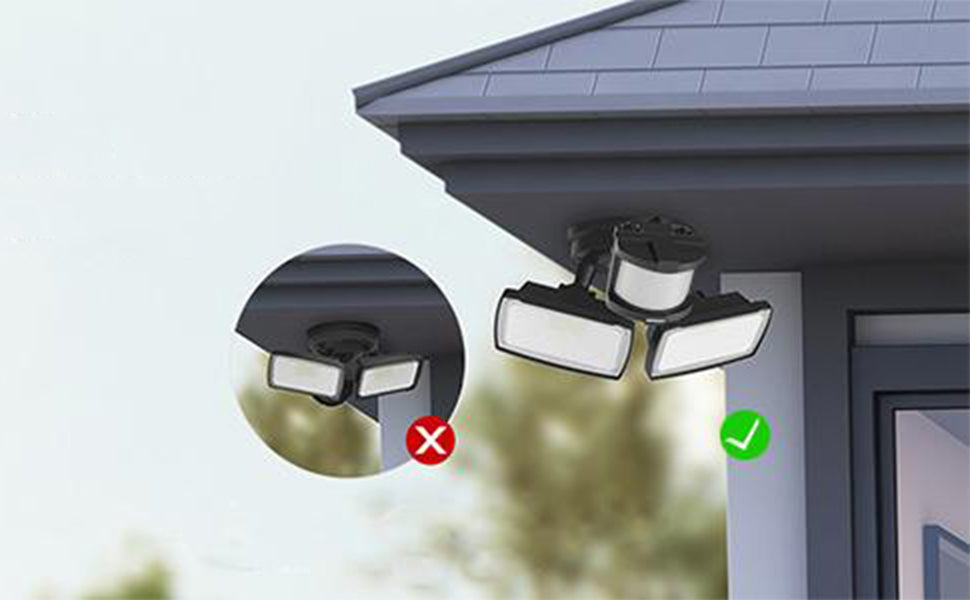
Place the sensor away from heat sources like vents or direct sunlight. Avoid pointing it toward busy streets or areas with constant movement. Use the correct height and angle for the sensor’s best range. Secure all wiring tightly to prevent loose connections. Follow manufacturer instructions carefully to avoid future problems.
Environmental Adjustments
Trim plants or tree branches near the sensor that might block its view. Avoid placing the sensor near objects that move in the wind. Adjust the sensitivity setting to match the environment. Lower sensitivity stops false triggers from small animals or leaves. Keep the sensor away from reflective surfaces that confuse it.
Credit: www.lepower-tec.com
When To Call A Professional
Knowing when to call a professional is important for fixing a motion sensor light that stays on. Some problems need expert help to avoid more damage or danger. Here are signs that you should get a professional involved.
Complex Electrical Issues
Electrical wiring can be tricky and risky. If the wiring looks old, damaged, or confusing, it is best to call an electrician. Professionals can check for hidden problems in the circuit. They have the tools to fix complex issues safely.
Persistent Sensor Malfunctions
Sometimes, the sensor keeps malfunctioning even after basic fixes. This could mean the sensor itself is faulty or there is a deeper problem. A professional can test the sensor and replace it if needed. They ensure the light works correctly again.
Safety Concerns
Safety must always come first. If you smell burning, see sparks, or the light flickers wildly, stop and call a pro. Handling electricity without knowledge can cause injuries or fires. Experts know how to keep the repair safe.
Frequently Asked Questions
Why Does My Motion Sensor Light Stay On All The Time?
A common cause is a faulty sensor or wiring issue. Dirt or insects on the sensor can also trigger constant light.
How Can I Reset A Motion Sensor Light That Won’t Turn Off?
Turn off the power, wait a few minutes, then turn it back on. This can clear sensor glitches.
Can Weather Affect Motion Sensor Light Performance?
Yes, bright sunlight or heavy rain can cause false triggers. Positioning the sensor away from direct sunlight helps.
What Role Does Sensor Sensitivity Play In Light Staying On?
High sensitivity can detect small movements, keeping the light on longer. Adjust sensitivity to reduce false alarms.
How Do I Clean A Motion Sensor To Fix Constant Lighting?
Use a soft cloth to gently wipe the sensor lens. Remove dust, spider webs, or insect debris carefully.
Can Wiring Problems Cause A Motion Sensor Light To Stay Lit?
Loose or damaged wires can cause constant power flow. Inspect wiring for breaks or loose connections.
Should I Check The Light’s Timer Settings If It Stays On?
Yes, incorrect timer settings can keep the light on. Adjust the timer to turn off after desired time.
Is It Possible That Nearby Heat Sources Affect The Sensor?
Yes, heat from HVAC units or vents can trigger the sensor. Move the light away from such heat sources.
When Should I Replace A Motion Sensor Light That Won’t Turn Off?
Replace it if cleaning, resetting, or adjusting settings doesn’t fix the issue. Sensors wear out over time.
How Does The Placement Of A Motion Sensor Affect Its Function?
Poor placement can cause constant triggering from moving trees or cars. Position it to avoid unnecessary motion.
Conclusion
Fixing a motion sensor light that stays on can be simple. Check the sensor’s settings and adjust the time and sensitivity. Clean the sensor lens to remove dust or dirt. Ensure the wiring is secure and not damaged. Sometimes, replacing old sensors solves the problem quickly.
Regular checks keep your light working properly. This saves energy and prevents annoyance. Taking these steps helps your light respond only when needed. A properly working sensor light adds safety and convenience to your home.