
Is your Epson printer acting up? Are you seeing smudges, streaks, or paper jams more often than you’d like?
The culprit might be your printer’s rollers. Over time, dust, ink, and paper debris can build up on these crucial components, affecting print quality and causing frustrating errors. But don’t worry, cleaning your Epson printer rollers is a straightforward process that can bring your printer back to life.
In this guide, we’ll walk you through exactly how to do it, step-by-step, so you can get back to printing flawlessly.

Credit: www.youtube.com
Why Clean Epson Printer Rollers?
Your Epson printer needs clean rollers. Dirty rollers cause many problems. Regular cleaning keeps your printer working well. It ensures good printouts. It also prevents frustrating issues.
Common Roller Issues
Dust builds up on rollers. Ink residue sticks to them. Paper fibers get trapped. These things make rollers sticky. They can also become uneven.
Impact On Print Quality
Dirty rollers affect your prints. You see faint lines. Streaks may appear. Images look blurry. Colors are not vibrant. Prints can smudge easily. Paper might feed unevenly. This ruins your documents.
Preventing Paper Jams
Clean rollers grip paper correctly. They pull paper smoothly. This stops paper jams. Jams waste time and paper. They can damage your printer. Clean rollers mean fewer jams. Your printer runs reliably.
Gather Your Cleaning Supplies
Before you start cleaning your Epson printer rollers, gather your supplies. Having everything ready makes the process smooth. This prevents interruptions. You will need a few simple items.
Lint-free Cloths
Use lint-free cloths. These are important. They will not leave fuzz behind. Regular paper towels can leave particles. These particles can cause more problems. Microfiber cloths work very well.
Distilled Water
Get some distilled water. Tap water has minerals. These minerals can leave deposits. Distilled water is pure. It cleans effectively. It is safe for your printer.
Isopropyl Alcohol (optional)
Isopropyl alcohol is optional. Use it for stubborn grime. A 70% solution is best. It dries quickly. It cuts through tough dirt. Use it sparingly. Always check your printer manual first.
Cotton Swabs
Cotton swabs are also useful. They reach small areas. They help clean tight spots. Use them with water or alcohol. They are great for detailed cleaning.
Locating The Rollers
First, find the paper feed rollers. These rubber parts grab your paper. They are usually inside the printer.
Finding your Epson printer’s rollers is the first step. These rollers grab paper. Dirty rollers cause printing problems. Let’s find them.Accessing The Paper Path
Open your printer. Look for the paper input area. This is where paper goes in. You might need to open a cover. Some printers have a rear access door. Check your printer manual. It shows you exactly where.Identifying Key Rollers
You will see several rollers. Some are black rubber. Others might be plastic. The main paper feed rollers are important. These are usually near the paper tray. They are the ones that touch the paper most. Look for rollers inside the paper path. They grip and move the paper. You need to clean these.Step-by-step Cleaning Process
Dirty rollers cause paper jams. Follow these simple steps. Gently clean your Epson printer rollers. This easy process restores smooth paper feeding.
Cleaning your Epson printer rollers is simple. Follow these steps. You will get better print quality. This guide makes it easy.Powering Down The Printer
First, turn off your printer. Unplug the power cord. This ensures safety. It prevents electrical shock. Wait a moment. The printer cools down.Gentle Wiping Technique
Use a lint-free cloth. Dampen it slightly. Use distilled water. Avoid harsh chemicals. Gently wipe each roller. Rotate the rollers by hand. Clean them all thoroughly. Remove any dust or debris. Be very careful. Do not force anything.Drying Time
Let the rollers air dry. This takes about 15 minutes. Ensure they are completely dry. Before plugging the printer back in. You can then resume printing. Enjoy your clean printer.Advanced Cleaning Methods
Sometimes, basic cleaning is not enough. Your Epson printer might need more. Advanced methods tackle stubborn dirt. These techniques ensure clear paper paths. They also improve print quality. Let’s explore these powerful options.
Using Cleaning Sheets
Epson offers special cleaning sheets. These sheets are designed for roller cleaning. You load them like regular paper. The printer pulls the sheet through. This process gently removes dust. It also lifts ink residue. Follow the sheet’s instructions carefully. Run the cleaning cycle multiple times if needed. This method is simple and effective. It keeps rollers pristine.
Manual Roller Rotation
Sometimes, you need direct control. Manual roller rotation helps here. First, turn off your printer. Unplug the power cord. Open the printer cover. Locate the printer rollers. You can see them inside. Gently rotate the rollers by hand. Move them forward and backward. Use a lint-free cloth. Lightly dampen the cloth. Use only distilled water. Wipe the rollers clean. Be very gentle. Do not force the rollers. Rotate and wipe each one. This gives you precise cleaning. It reaches all roller surfaces.
Troubleshooting Common Problems
Printer problems happen. Don’t worry. We can fix them. Cleaning rollers solves many issues. Let’s troubleshoot together. We will get your Epson printer working.
Stubborn Ink Smudges
Ink smudges mar your prints. This often means dirty rollers. Ink builds up over time. This transfers to your paper. It looks messy. Cleaning is the solution. Use a lint-free cloth. Dampen it slightly. Use distilled water. Gently wipe the rollers. Move the cloth back and forth. Ensure you reach all parts. Let the rollers dry completely. This removes sticky residue. Your prints will be clean again.
Persistent Paper Feed Issues
Paper jams frustrate everyone. Rollers grip the paper. Dirty rollers lose their grip. This causes feeding problems. Paper might not move. It could feed crookedly. It might even tear. Clean rollers fix this. Use a damp cloth again. Wipe the paper feed rollers. Be thorough with your cleaning. Remove any dust or debris. Dry rollers improve traction. Your printer will feed paper smoothly. Enjoy jam-free printing.
Maintaining Clean Rollers
Keep your Epson printer rollers clean. This ensures smooth paper feeding. Regular cleaning prevents jams and smudges.
Your Epson printer has rollers. These rollers move paper. Keeping them clean is important. Clean rollers ensure good print quality. They prevent paper jams. This section helps you maintain them.Regular Cleaning Schedule
Clean your rollers often. Make a cleaning schedule. Aim for weekly cleaning. If you print a lot, clean more. A clean printer works better.Proper Paper Handling
Handle paper with care. Do not touch the paper surface. Oils from your hands transfer. This dirt sticks to rollers. Use clean, dry hands.Avoiding Overfeeding
Do not put too much paper in. This is overfeeding. It strains the rollers. It can cause jams. Check your printer’s capacity. Load paper correctly.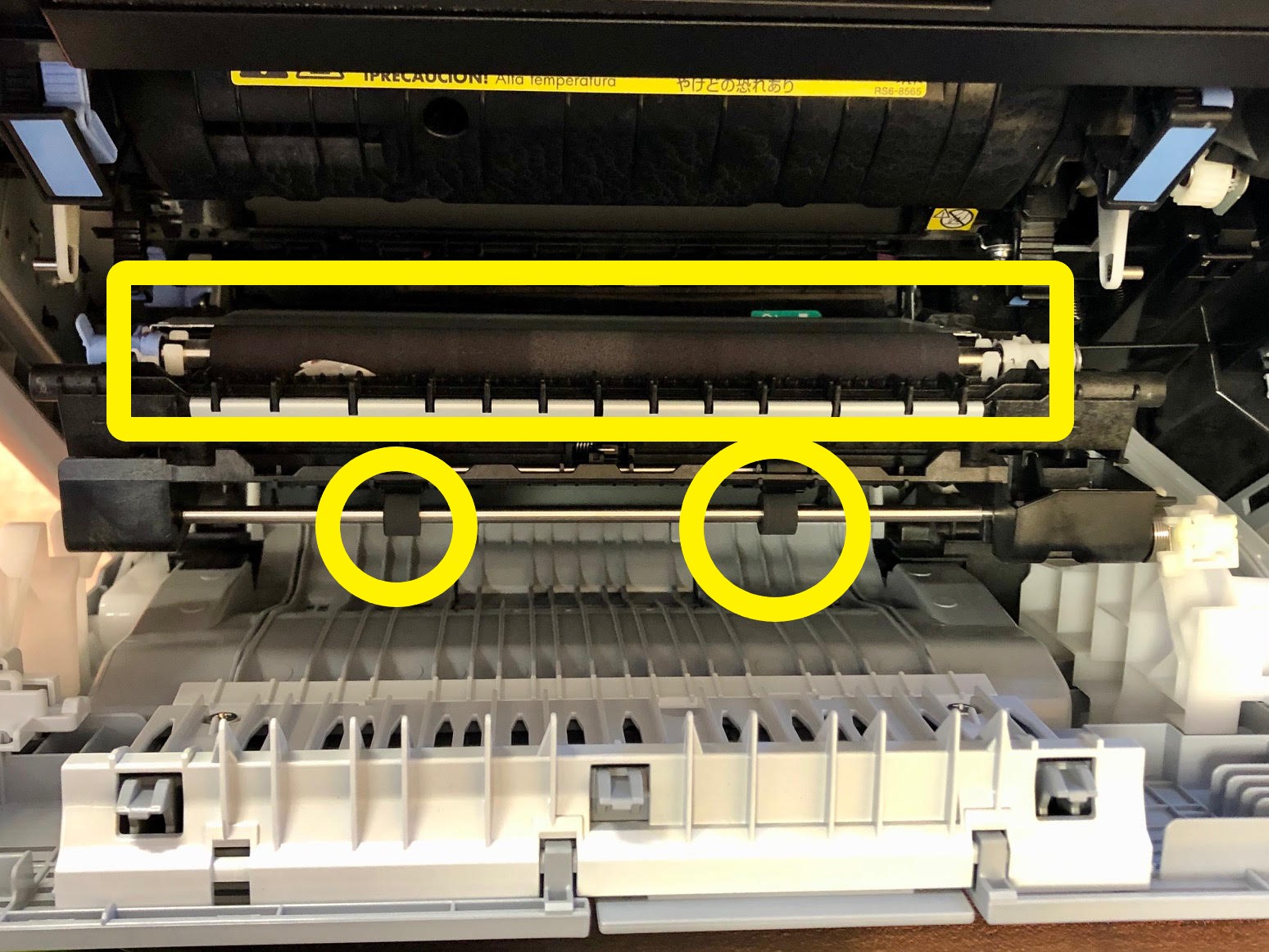
Credit: www.tonerbuzz.com

Credit: files.support.epson.com