
Best computer uninterruptible power supply units A reliable unit provides essential battery backup and surge protection to keep your electronics running safely.
Real Life Opening
You’re in the middle of an important project when the power suddenly cuts out. Without a backup, your unsaved work disappears, and your computer hardware faces the risk of damage from a sudden electrical surge.
These units act as a safety net, giving you time to save your files and shut down your equipment properly. They also filter out power noise and voltage spikes that happen daily. Here are the top choices for protecting your setup.
As an Amazon Associate, we earn from qualifying purchases. This post contains affiliate links – if you buy through them, we may earn a commission at no extra cost to you.
1. CyberPower CP1500PFCLCD PFC Sinewave UPS Battery Backup and Surge Protector

Best for: Users needing reliable power for high-end workstations.
This unit offers 1500VA/1000W output and uses a sine wave design. It’s built to support computers with Active PFC power supplies, which are common in modern gaming rigs and professional workstations.
The color LCD screen tilts, making it easy to read if the unit sits on the floor. It displays power conditions in real time, alerting you to issues before they cause downtime.
Pros
- Pure sine wave output for sensitive gear
- Twelve total outlets for many devices
- Color LCD screen is easy to read
- Includes two fast-charging USB ports
- Three-year warranty covers the battery
- Tested and listed by UL safety standards
Cons
- Heavy unit takes up desk space
- Power cord is five feet long
Why this one: This is a robust choice for those who need to protect sensitive hardware. Its ability to handle Active PFC power supplies makes it a versatile pick for most home offices.
2. APC BR1500MS2 Pure Sine Wave UPS Battery Backup & Surge

Best for: Users with sensitive NAS drives and home office gear.
The APC BR1500MS2 delivers pure sine wave power, which is essential for sensitive electronics like NAS drives. It provides 1500VA/900W and includes ten outlets to keep your entire desk setup connected during a blackout.
The unit features an angled LCD that shows your runtime in minutes, which is helpful when you need to know exactly how long you have to save your work. It also protects your data lines with built-in coax and Ethernet ports. This model isn’t ideal for users who don’t have enough space for a larger tower-style unit.
Pros
- Pure sine wave protects sensitive electronics
- Displays runtime in minutes on screen
- Includes Ethernet and coax surge protection
- Battery is user-replaceable.
- Front-facing USB ports for easy charging
- Silenceable alarm prevents annoying noise
Cons
- Requires space for a large footprint
- Battery replacement is a separate purchase
Why this one: This unit is excellent for anyone who wants detailed information about their power status. The pure sine wave output is a major benefit for high-end gear. If you’re very limited on desk space, you should look at a more compact option.
3. GOLDENMATE 1000VA/800W Lithium UPS Battery Backup & Surge Protector

Best for: Users wanting long-term battery life and efficiency.
This model uses a LiFePO4 lithium battery, which is designed for a longer lifespan than traditional lead-acid alternatives. It provides 1000VA/800W and includes eight outlets.
The built-in cooling fan helps maintain performance, though it may activate during heavy use. It also features a buzzer mute function, which is useful if you work in a quiet office. This unit isn’t for those who need the highest possible power capacity for multiple high-draw gaming PCs.
Pros
- Lithium battery lasts up to 10 years
- Silent operation with buzzer mute feature
- Advanced battery management system included
- Efficient cooling system for stable performance
- Real-time LCD monitoring of power status
- Maintenance-free operation for many years
Cons
- Cooling fan noise during heavy loads
- Not designed for very high-draw setups
Why this one: If you want a modern battery solution that lasts a long time without maintenance, this is a top candidate. It’s well-suited for standard workstations. Those running extremely demanding power-hungry systems might prefer a higher wattage unit instead.
4. APC BX1500M UPS Battery Backup & Surge Protector

Best for: Reliable backup for busy home offices.
This unit provides 1500VA/900W and is designed to handle common power issues like brownouts and surges. It has ten outlets, with five dedicated to battery backup and five for surge-only protection.
The unit is ENERGY STAR certified, meaning it’s built for efficiency. It also features a user-replaceable battery, which helps extend the life of the unit as it ages. This model isn’t the best choice if you don’t have a need for high-capacity backup for multiple peripherals.
Pros
- High capacity for home office setups
- ENERGY STAR certified for efficiency
- Protects against brownouts without battery drain
- Includes Ethernet and coaxial surge protection
- Battery is easy to replace by user
- Intuitive LCD shows load and runtime
Cons
- Replacement battery is sold separately
- Large size for small desks
Why this one: This is a solid choice for someone who needs to keep several devices powered simultaneously. The efficiency ratings make it a smart pick for daily use.
5. CyberPower EC850LCD Ecologic UPS Battery Backup and Surge Protector

Best for: Users focused on reducing energy waste.
The CyberPower EC850LCD is built with an ECO mode. This feature turns off power to connected peripherals when it detects your computer is in sleep mode or turned off, saving energy.
It provides 850VA and includes twelve outlets. The LCD panel gives you clear information on power conditions at a glance. Because of its specific energy-saving focus, it may not provide enough power for users with very heavy hardware requirements.
Pros
- Twelve total outlets for many devices
- Clear LCD panel for power monitoring
- Includes a three-year warranty
- Compact enough for most desks
- Protects peripherals from surges
Cons
- Lower power capacity than other picks
- ECO mode requires proper device setup
Why this one: This unit is perfect for the eco-conscious user who wants to save on power bills while protecting their gear. It’s a great fit for standard office setups.
6. APC BE600M1 UPS Battery Backup & Surge Protector

Best for: Small desks and simple, compact setups.
This compact unit is designed for basic needs, such as keeping your router and computer running during short outages. It provides 600VA and includes five battery-backed outlets.
A unique feature is the 1.5A USB port, which stays powered even during an outage to keep your phone charged. It’s very easy to replace the battery when it eventually wears out. This unit isn’t suited for users who have many peripherals or high-power equipment.
Pros
- Very compact for small spaces
- USB port charges phone during outages
- Battery is easy to swap out
- Protects router and internet connectivity
- Multiple well-spaced outlets for plugs
- Simple, reliable surge protection
Cons
- Limited runtime for heavy loads
- Not for high-power gaming PCs
Why this one: If you only need to keep your internet connection and a single computer safe, this is a great, space-saving choice. It’s simple to use and maintain.
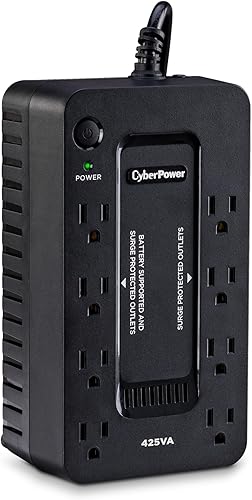
7. CyberPower ST425 Standby UPS Battery Backup and Surge Protector
Best for: Protecting gaming consoles and light home office gear.
The CyberPower ST425 is a 425VA/260W standby unit designed for home entertainment and light office equipment. It’s highly efficient due to its compact charger design.
It features eight outlets, four of which provide battery backup. An LED light indicates if there’s a wiring fault, providing a quick safety check. This unit isn’t intended for high-end workstations that require pure sine wave power.
Pros
- Efficient design reduces power consumption
- Eight outlets for multiple devices
- LED light alerts to wiring faults
- Compact size fits under desks easily
- Transformer-spaced outlets for large plugs
- Three-year warranty included
Cons
- Lower wattage for basic gear only
- Simulated sine wave output
Why this one: This unit is ideal for home entertainment centers or small office setups where space is tight. Its simplicity is a benefit for those who just need basic protection.
How to Choose Yours
Choosing the right unit depends on your specific hardware and your daily routine. Don’t just look at the highest number; pick a unit that matches the power draw of your devices.
- How many devices do you need to keep powered during an outage?
- Does your computer require pure sine wave power for its supply?
- Is there enough physical space on your desk for a tower?
- Do you need extra features like USB charging for your phone?
- Will you be able to replace the battery yourself later on?
- Does your setup have specific equipment like NAS drives or routers?
The Verdict for Most People
For most users, the CyberPower CP1500PFCLCD is the best choice because it offers the right balance of pure sine wave power and high capacity. It handles modern electronics reliably while providing enough outlets for a full workspace.
If you have a very limited space or only need to protect a router and a laptop, the APC BE600M1 is a better, more compact pick. Always check your equipment’s power needs before you decide.
Related guides
- 9 Best Computer Mobile Device Repair Kits for Every Project in 2026
- 10 Best Battery Powered Scooter Picks for Your Daily Commute in 2026
- 10 Best Computer Systems Analysis Design Books for Architects in 2026
Frequently Asked Questions
How do I know if my computer needs a pure sine wave UPS?
Modern computers with Active PFC power supplies usually require pure sine wave output to run safely during a power outage. If your power supply is high-end or designed for gaming, you must choose a unit that explicitly states it provides pure sine wave power.
Can I replace the battery myself when it wears out?
Many of the units listed here feature user-replaceable batteries, which can save you from buying a new system. You should check the manufacturer’s manual for the specific battery model number and safety steps before attempting a swap to ensure you follow the correct procedure.
Should I plug my printer into the battery backup outlets?
It’s generally recommended to use surge-only outlets for printers rather than battery backup outlets. Printers often have high power spikes that can overload a UPS, potentially causing it to shut down or trigger an alarm, so keeping them on surge-only ports is the safer choice.
What is the difference between surge protection and battery backup?
Surge protection shields your devices from sudden voltage spikes, while battery backup keeps your equipment running during a total power loss. Most units offer both, but only the battery-backed outlets will keep your computer running when the power actually goes out.
Is it worth owning a UPS for a home setup?
A UPS prevents data loss and protects hardware from electrical damage caused by daily power fluctuations. While many people only think of them during storms, they work 24/7 to keep your equipment stable and safe from unexpected electrical events.
How do I set up my new unit for the first time?
Most units are plug-and-play, but you should always charge the battery fully as instructed before connecting your devices. Ensure you use the included cables and follow the manual’s guidance on how to properly test the unit’s backup functionality before putting it into daily service.
Final Thoughts
Choosing the right backup power doesn’t have to be complicated. Once you’ve picked a model that fits your gear, you’ll finally have peace of mind during those unpredictable storms. Don’t wait for the next blackout to happen; go ahead and plug your system in today so you’re ready for anything.