
To reset a phantom gogo scooter, hold the power button down for 10 seconds while the unit is stationary, or press the small pinhole reset button near the charging port. You can clear minor controller errors immediately by turning off the ignition key, unplugging the battery pack, and waiting 5 minutes.
A reset reboots the central motor controller so it clears temporary error codes and throttle glitches. If your battery holds a good charge, a standard reset usually works; if the voltage has dropped too low, the scooter won’t turn on regardless of how many times you reset it.
The biggest initial error is trying to reset the system while the charging cable is still connected to the wall. This activates a built-in safety interlock that prevents the scooter’s computer from restarting properly.
Resetting the Scooter
-
Turn off the main power switch or remove the ignition key from the console. This stops the electrical current from reaching the motor controller while you work. Tip: Never attempt a reset while standing on the deck or rolling the wheels.
-
Disconnect the charger completely from the wall outlet and pull the charging plug out from the scooter’s frame.
-
Locate the circuit breaker button or pinhole reset switch, which sits near the charging port or underneath the rear battery housing. This varies by model — check the label on your frame if you don’t see a small black rubber button.
-
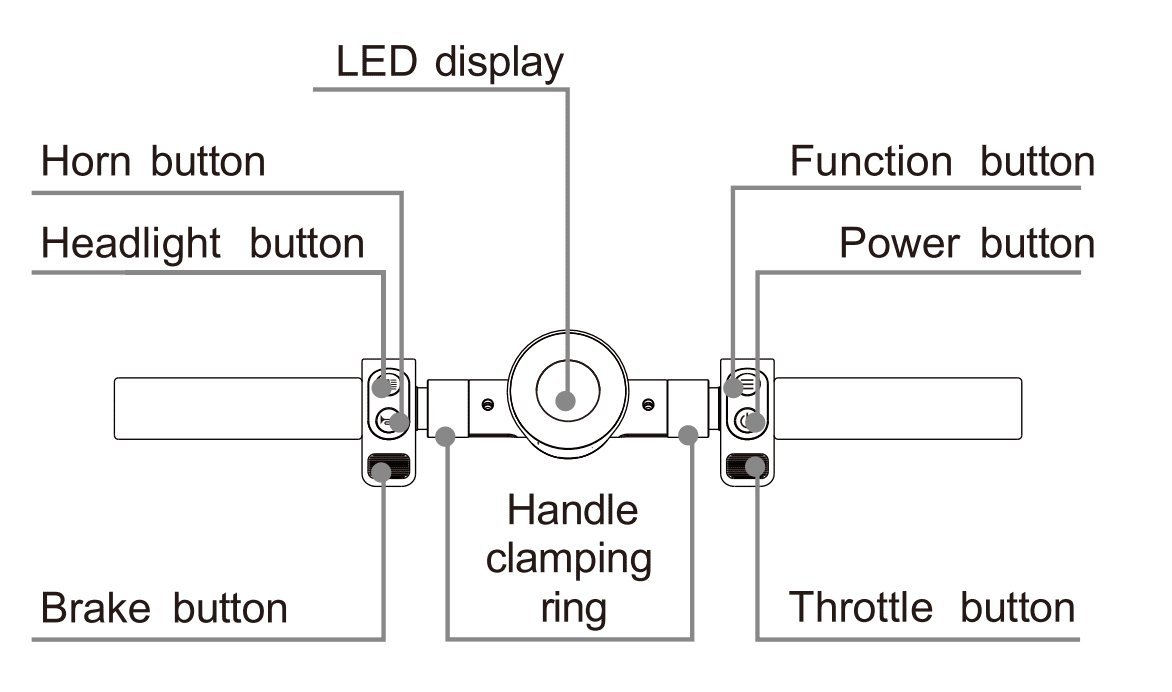
Press and hold the power button on the handlebar display for 10 full seconds, then release it. On units equipped with a physical breaker, push the button inward until you hear a sharp mechanical click.
-
Remove the battery pack completely from its tray for 5 minutes if your model features a detachable pack.
-
Reconnect the battery pack firmly, insert the key, and press the power button for 2 seconds to turn the system back on. If you smell burning plastic, see melted wiring, or the display stays blank after these steps, stop immediately and contact a certified electric mobility technician.
How long it takes
Resetting this scooter requires only a few minutes, though deeper electrical clears take slightly longer.
| Situation | How long | What changes it | What to watch for |
|---|---|---|---|
| Standard button reset | 10 to 15 seconds | Firmware version and display type | Screen flashing off and on |
| Circuit breaker reset | 1 to 2 minutes | Accessibility of the breaker switch | A firm click under your thumb |
| Full battery power drain | 5 to 7 minutes | Size of internal controller capacitors | Complete loss of display backlights |
If the system remains unresponsive after 20 minutes of troubleshooting, the problem is usually a blown fuse or an internal controller failure rather than a software lock.
How to tell when it’s done

The reset is finished when the handlebar display lights up with all normal icons and shows no flashing error codes. You’ll hear a short single beep on startup, and the headlight will toggle on normally without flickering. The battery gauge should show a steady voltage reading rather than bouncing up and down between empty and full bars. The definitive test is lifting the drive wheel off the ground and gently squeezing the throttle: the motor must spin smoothly without any stuttering, jerking, or cutting out. For standard electrical safety guidance on personal mobility devices, consult the CPSC micromobility safety guidelines before riding.
Mistakes that ruin it
- Pressing the throttle during boot-up: The controller registers an abnormal throttle position, which locks the unit back into an error state. Keep your hands completely off the accelerator levers until the screen is fully illuminated.
- Skipping the power drain period: Plugging the battery right back in doesn’t give the controller capacitors enough time to clear their stored voltage.
- Using sharp metal pins in the reset hole: Sticking metal needles into tiny openings can short-circuit delicate circuit boards, ruining the throttle assembly. Use a blunt plastic probe or an unbent wooden toothpick instead.
- Ignoring the mechanical brake levers: A stuck brake sensor sends a constant cutoff signal to the motor, which makes the reset seem broken. Check that both brake levers snap all the way forward before you reset.
Frequently asked questions

Can I reset the scooter while it’s charging?
No. The scooter has an automatic charging lockout designed to keep riders safe. The motor controller won’t reboot or respond to throttle inputs as long as the charging cable is plugged into the charging port. Always unplug the power brick first.
Why is my Phantom GoGo scooter beeping continuously?
A continuous beep signals an active controller fault, a low-voltage battery warning, or an engaged kickstand sensor. If pushing the reset button doesn’t silence the alarm, turn the scooter off, release the throttle and brake levers fully, and recharge the battery for an hour before testing again.
What happens if the reset button doesn’t click?
If the reset button feels loose or won’t click, the internal circuit breaker hasn’t tripped. You don’t need to force it. Instead, disconnect the battery pack for 5 minutes or use the 10-second power button hold method on the handlebar display to clear the system.
How long does the battery need to unplug to clear errors?
Is it safe to reset the scooter in the rain?
No. Moisture can easily get into open battery compartments, charging ports, or unsealed reset buttons, causing immediate electrical short circuits. Always move your scooter into a dry, covered area and wipe the frame down completely with a dry towel before opening any panels or unplugging cables.
Final Thoughts
If your scooter still doesn’t run smoothly after these quick fixes, it’s time to reach out to the manufacturer’s support team. They’ll help you determine if a part needs replacing so you can get back to riding safely. Don’t worry, you’ll be cruising around your neighborhood again in no time.